04 — RealWorldQA
Introduction
RealWorldQA is a benchmark designed to evaluate vision-language models (VLMs) on practical, real-world visual understanding tasks. Unlike academic benchmarks such as MMMU that test expert-level knowledge from college exams, RealWorldQA focuses on the kind of everyday spatial reasoning and scene understanding that humans perform effortlessly — reading signs, counting objects, understanding spatial relationships, identifying hazards, and interpreting real photographs of streets, buildings, dashboards, and natural scenes.
Source: xAI (Elon Musk’s AI company), released in 2024.
Paper: No formal peer-reviewed paper — released directly as a dataset and benchmark on HuggingFace.
Primary metric: Accuracy (%) — the percentage of questions answered correctly. Higher is better.
What RealWorldQA measures: Given a real-world photograph and a multiple-choice question about the scene, the model must select the correct answer. Questions are deliberately designed to be easy for humans but challenging for AI — they test grounded, practical visual understanding rather than academic knowledge or complex reasoning chains.
- 765 questions based on real-world photographs.
- Multiple-choice format — typically 4 answer options per question.
- Multimodal by design — every question requires understanding a photograph. Text-only models cannot meaningfully complete this benchmark.
- Single image per question — simpler than MMMU’s multi-image questions.
- Zero-shot evaluation only — no official training split exists, so all evaluation is zero-shot.
- Random baseline: ~25% for 4-choice questions.
- A model scoring 25% has no visual understanding; a model scoring 70%+ demonstrates strong practical perception.
Formula & Intuition
The Core Metric
RealWorldQA accuracy is conceptually identical to MMLU and MMMU — count correct answers and divide by total questions:
\[\text{Accuracy} = \frac{\text{Number Correct}}{\text{Total Questions}} \times 100\%\]For RealWorldQA’s 765 questions, if a model gets 520 correct:
\[\text{Accuracy} = \frac{520}{765} \times 100\% = 67.97\%\]Since there is only a single evaluation split with no subject-level breakdown, the overall accuracy is the only standard metric. Some evaluators additionally report per-category accuracy if they manually annotate question categories, but this is not an official part of the benchmark.
How the Model Picks an Answer
There are two evaluation methods, following the same pattern as MMLU and MMMU:
Why “Easy for Humans, Hard for AI”?
The questions in RealWorldQA are designed to test grounded perception — the kind of understanding that comes from physically existing in the world. Consider:
- A human can instantly tell “there are 3 traffic lights in this image” — a VLM may hallucinate extra objects or miss partially occluded ones.
- A human can read a partially obscured road sign with ease — a VLM may fail if the text is at an angle or partially blocked.
- A human understands “the car on the left is closer” from depth cues — a VLM processes a flat 2D image and must infer depth.
This makes the benchmark a practical litmus test: if a VLM cannot handle these questions, it is unlikely to be useful for applications like autonomous driving perception, robotics, or visual assistants.
Random Baseline and Confidence Intervals
With 765 questions and 4 choices each:
\[\text{Random baseline} = \frac{1}{4} \times 100\% = 25\%\]Each question is worth approximately $\frac{1}{765} \times 100\% \approx 0.13\%$ of the total score. The 95% confidence interval for a model scoring accuracy $p$ on $n = 765$ questions is:
\[\text{CI}_{95} = p \pm 1.96 \sqrt{\frac{p(1-p)}{n}}\]For a model scoring 65%:
\[\text{CI}_{95} = 65\% \pm 1.96 \sqrt{\frac{0.65 \times 0.35}{765}} \approx 65\% \pm 3.4\%\]This means score differences of less than ~3–4% between models may not be statistically significant on this small benchmark.
Dataset Details
Quantitative Overview
| Property | Value |
|---|---|
| Total questions | 765 |
| Splits | Single evaluation split (test) — no train, dev, or validation |
| Question format | Multiple-choice (typically 4 options, A–D) |
| Images per question | 1 |
| Image type | Real photographs (not synthetic or illustrations) |
| Evaluation protocol | Zero-shot only (no training split available) |
| HuggingFace identifier | xai-org/RealWorldQA |
| License | Apache 2.0 |
Question Categories
RealWorldQA covers a range of practical visual understanding tasks. While there is no official category taxonomy, the questions broadly fall into the following types:
| Category | Description | Example Question |
|---|---|---|
| Spatial reasoning | Relative positions, orientations, proximity | “What is to the right of the fire hydrant?” |
| Counting | Enumerating objects in scenes | “How many traffic lights are visible?” |
| Text reading (OCR) | Signs, labels, license plates, storefront names | “What does the road sign say?” |
| Scene understanding | Weather, time of day, location type, season | “What season is it in this image?” |
| Navigation | Directions, road identification, wayfinding | “Which direction is the arrow pointing?” |
| Safety/hazards | Identifying dangerous conditions | “Is it safe to cross the street?” |
| Physical reasoning | Balance, stability, material properties | “Will this stack of objects fall over?” |
| Object identification | Recognizing specific objects or their attributes | “What type of vehicle is shown?” |
Image Characteristics
All images in RealWorldQA are real photographs taken in everyday settings:
- Outdoor scenes: Streets, intersections, parking lots, parks, buildings
- Indoor scenes: Kitchens, offices, stores, workshops
- Vehicles: Dashboard views, parking situations, road conditions
- Natural settings: Landscapes, weather phenomena, vegetation
- Variable quality: Varying lighting, angles, resolution, and occlusion — reflecting real-world conditions
Question Format
Every question follows a simple structure:
1
2
3
4
5
6
7
<image>
Question: <question text about the photograph>
A. <choice A>
B. <choice B>
C. <choice C>
D. <choice D>
Answer: <correct letter>
Some questions may have fewer or more than 4 choices, but 4 is the most common.
Loading the Dataset
1
2
3
4
5
6
7
8
9
10
11
12
13
14
from datasets import load_dataset

dataset = load_dataset("xai-org/RealWorldQA", split="test")

# Each example has:
#   "image": PIL.Image        — the real-world photograph
#   "question": str            — the question text
#   "choices": List[str]       — answer options (typically 4)
#   "answer": str              — correct answer letter (e.g., "B")

print(f"Total questions: {len(dataset)}")  # 765
print(dataset[0]["question"])
print(dataset[0]["choices"])
print(dataset[0]["image"])  # PIL.Image object
HuggingFace dataset identifier:
xai-org/RealWorldQAwith a singletestsplit.
Comparison with Related Benchmarks
| Feature | RealWorldQA | MMMU | MMBench | SEED-Bench |
|---|---|---|---|---|
| Questions | 765 | 11,500 | 3,000+ | 19,000+ |
| Images | Real photos | Academic figures | Mixed | Mixed |
| Images/question | 1 | 1–7 | 1 | 1 |
| Focus | Practical perception | Expert knowledge | General VLM | Multimodal understanding |
| Splits | Test only | Dev/Val/Test | Dev/Test | Dev/Test |
| Evaluation | Zero-shot | Zero-shot | Zero-shot | Zero-shot |
Tensor Shapes at Every Stage
This section walks through the complete VLM evaluation pipeline with concrete tensor shapes at every step. We use a typical VLM architecture (e.g., LLaVA-style with SigLIP vision encoder + LLM backbone) as a concrete example. Unlike MMMU, RealWorldQA always has exactly 1 image per question, simplifying the pipeline.
1
2
3
4
5
6
7
8
9
10
11
12
13
14
15
16
17
18
19
20
21
22
23
24
25
26
27
28
29
30
31
32
33
34
35
36
37
38
39
40
41
42
43
44
45
46
47
48
49
50
51
52
53
54
55
56
57
58
59
60
61
62
63
64
65
66
67
68
69
70
71
72
73
74
75
76
77
78
79
80
81
82
83
84
85
86
87
88
89
90
91
92
93
94
95
96
97
98
99
100
101
102
103
104
105
106
107
108
109
110
111
112
113
114
115
116
117
118
119
120
121
122
123
124
125
126
127
128
129
130
131
132
133
134
135
136
137
138
139
140
┌─────────────────────────────────────────────────────────────────┐
│ Step 1: Load question                                           │
│                                                                 │
│ image: PIL.Image              # one real-world photograph       │
│ question: str                 # e.g., "How many traffic         │
│                               #   lights are visible?"          │
│ choices: List[str]            # e.g., ["2", "3", "4", "5"]     │
│   len(choices) = C            # typically C = 4                 │
│ answer: str                   # e.g., "B" (= "3")             │
└───────────────────────────────┬─────────────────────────────────┘
                                │
                                ▼
┌─────────────────────────────────────────────────────────────────┐
│ Step 2: Process image through vision encoder                    │
│                                                                 │
│ For a ViT-based vision encoder (e.g., SigLIP @ 384px):         │
│                                                                 │
│   raw_image: PIL.Image        # arbitrary resolution            │
│   resized: (3, 384, 384)      # RGB, resized/cropped to 384×384│
│   patch_size: 16                                                │
│   num_patches: (384/16)² = 576 patches                          │
│                                                                 │
│ After ViT forward pass:                                         │
│   patch_embeddings: (576, vision_hidden_dim)  # (576, 1152)    │
│                                                                 │
│ For a single image:                                             │
│   image_features: (1, 576, 1152)                                │
│                                                                 │
│ After linear projection to LLM hidden dim:                      │
│   projected: (1, 576, llm_hidden_dim) # e.g., (1, 576, 4096)  │
│                                                                 │
│ Final image token sequence:                                     │
│   image_embeds: (1, 576, 4096)  # ready for LLM               │
│                                                                 │
│ Note: Token count varies by model:                              │
│   CLIP ViT-L/14 @ 336px → 576 tokens                           │
│   SigLIP-SO400M @ 384px → 576 tokens                           │
│   InternViT-6B @ 448px  → 1024 tokens                          │
│   Qwen2-VL (dynamic)    → 256–1280 tokens                      │
└───────────────────────────────┬─────────────────────────────────┘
                                │
                                ▼
┌─────────────────────────────────────────────────────────────────┐
│ Step 3: Tokenize text and construct combined input              │
│                                                                 │
│ Text tokenization:                                              │
│   text = "Question: How many traffic lights are visible?\n"     │
│          "A. 2\nB. 3\nC. 4\nD. 5\nAnswer:"                     │
│   text_ids: (1, text_len)        # e.g., (1, 80)              │
│   text_embeds: (1, 80, 4096)     # after embedding lookup      │
│                                                                 │
│ Combine image and text embeddings:                              │
│   # Image tokens inserted at <image> placeholder position       │
│   combined_embeds: (1, text_len + num_image_tokens, hidden_dim)│
│                  = (1, 80 + 576, 4096)                          │
│                  = (1, 656, 4096)                                │
│                                                                 │
│ Attention mask:                                                 │
│   attention_mask: (1, 656)       # all ones (no padding)        │
│                                                                 │
│ Total sequence length = text tokens + image tokens              │
│   With 576 image tokens: 80 + 576 = 656 tokens                 │
│   With 1024 image tokens: 80 + 1024 = 1104 tokens              │
│   (much smaller than MMMU's multi-image sequences)              │
└───────────────────────────────┬─────────────────────────────────┘
                                │
                                ▼
┌─────────────────────────────────────────────────────────────────┐
│ Step 4: Forward pass through the VLM (language model)           │
│                                                                 │
│ Input embeddings: (1, 656, 4096)                                │
│                                                                 │
│ Through transformer layers (e.g., 32 layers for a 7B model):   │
│   layer_0_out:  (1, 656, 4096)                                  │
│   layer_1_out:  (1, 656, 4096)                                  │
│   ...                                                           │
│   layer_31_out: (1, 656, 4096)                                  │
│                                                                 │
│ LM head projection:                                             │
│   logits: (1, 656, vocab_size)   # e.g., (1, 656, 128256)     │
│                                                                 │
│ Tensor size:                                                    │
│   1 × 656 × 128,256 = ~84M floats                              │
│   At bfloat16: ~168 MB for this single question                │
│                                                                 │
│ Note: Much smaller than MMMU (which can exceed 4000 tokens      │
│ with multi-image questions). RealWorldQA is memory-friendly.    │
└───────────────────────────────┬─────────────────────────────────┘
                                │
                                ▼
┌─────────────────────────────────────────────────────────────────┐
│ Step 5: Extract prediction                                      │
│                                                                 │
│ ── Log-Likelihood Mode ──                                       │
│                                                                 │
│ last_token_logits = logits[0, -1, :]                            │
│ last_token_logits: (128256,)                                    │
│                                                                 │
│ choice_token_ids: (4,)   # token IDs for "A", "B", "C", "D"   │
│ choice_logits = last_token_logits[choice_token_ids]             │
│ choice_logits: (4,)      # e.g., tensor([1.2, 4.8, 0.3, -1.1])│
│                                                                 │
│ prediction = argmax(choice_logits)                              │
│ prediction: scalar (int)  # 0=A, 1=B, 2=C, 3=D                │
│ # In our example: argmax = 1, so model predicts "B"            │
│                                                                 │
│ ── Generation Mode ──                                           │
│                                                                 │
│ Generated autoregressively:                                     │
│   output_ids: (1, gen_len)   # e.g., (1, 5) for "B"           │
│   decoded_text: str          # e.g., "B" or "The answer is B"  │
│                                                                 │
│ Parsed answer: str           # extracted letter from generation │
└───────────────────────────────┬─────────────────────────────────┘
                                │
                                ▼
┌─────────────────────────────────────────────────────────────────┐
│ Step 6: Compare with ground truth                               │
│                                                                 │
│ ground_truth: str             # e.g., "B"                      │
│ predicted_letter: str         # e.g., "B"                      │
│                                                                 │
│ correct = (predicted_letter == ground_truth)                    │
│ correct: bool                 # True or False                   │
└───────────────────────────────┬─────────────────────────────────┘
                                │
                                ▼
┌─────────────────────────────────────────────────────────────────┐
│ Step 7: Aggregate over all 765 questions                        │
│                                                                 │
│ all_correct: (765,)               # boolean array               │
│ total_correct = sum(all_correct)                                │
│ total_correct: scalar (int)       # e.g., 520                  │
│                                                                 │
│ accuracy = total_correct / 765 × 100                            │
│ accuracy: scalar (float)          # e.g., 67.97%               │
│                                                                 │
│ No per-subject or per-discipline aggregation needed —            │
│ RealWorldQA reports a single overall accuracy number.           │
└─────────────────────────────────────────────────────────────────┘
Vision Encoder Variants and Token Counts
Different VLMs produce different numbers of image tokens for RealWorldQA’s single-image questions:
| Vision Encoder | Input Resolution | Patch Size | Tokens per Image | Example VLMs |
|---|---|---|---|---|
| CLIP ViT-L/14 | 224×224 | 14 | 256 | LLaVA-1.5 (low-res) |
| CLIP ViT-L/14 | 336×336 | 14 | 576 | LLaVA-1.5 (high-res) |
| SigLIP-SO400M | 384×384 | 14 | 729 | PaliGemma |
| InternViT-6B | 448×448 | 14 | 1024 | InternVL2 |
| Qwen-VL ViT | Dynamic | 14 | 256–1280 | Qwen-VL, Qwen2-VL |
| CLIP ViT-L/14 (multi-crop) | 336×336 × N crops | 14 | 576 × N | LLaVA-NeXT |
Impact on RealWorldQA: Since each question has exactly 1 image, sequence lengths are manageable even with high-resolution encoders. A model with 1024 tokens/image at 448px will have a total sequence of ~1100 tokens — well within any modern model’s context window.
Shape Transformation Summary
| Stage | Shape | Example |
|---|---|---|
| Raw image | (3, H, W) |
(3, 384, 384) |
| ViT patches | (num_patches, vision_dim) |
(576, 1152) |
| Projected image tokens | (1, num_patches, llm_dim) |
(1, 576, 4096) |
| Text tokens | (1, text_len) |
(1, 80) |
| Combined input | (1, total_len, llm_dim) |
(1, 656, 4096) |
| Logits | (1, total_len, vocab_size) |
(1, 656, 128256) |
| Choice logits | (num_choices,) |
(4,) |
| Prediction | scalar | 1 (= “B”) |
| Final accuracy | scalar | 67.97 |
Evaluation Procedure (Pseudocode)
1
2
3
4
5
6
7
8
9
10
11
12
13
14
15
16
17
18
19
20
21
22
23
24
25
26
27
28
29
30
31
32
33
34
35
36
37
38
39
40
41
42
43
44
45
46
47
48
49
50
51
52
53
54
55
56
57
58
59
60
61
62
63
64
65
66
67
68
69
70
71
FUNCTION evaluate_realworldqa(model, processor):
    dataset ← load("xai-org/RealWorldQA", split="test")
    total_correct ← 0

    FOR each example IN dataset:
        # Step 1: Extract components
        image ← example["image"]
        question ← example["question"]
        choices ← example["choices"]
        answer ← example["answer"]

        # Step 2: Construct prompt
        prompt ← format_mc_prompt(question, choices)
        # e.g., "<image>\nQuestion: How many traffic lights?\n
        #         A. 2\nB. 3\nC. 4\nD. 5\nAnswer:"

        # Step 3: Process inputs (text + image)
        inputs ← processor(
            text=prompt,
            images=[image],
            return_tensors="pt"
        ).to(device)
        # inputs contains:
        #   input_ids: (1, seq_len)
        #   pixel_values: (1, 3, H, W)
        #   attention_mask: (1, seq_len)

        # Step 4: Forward pass (generation mode)
        WITH torch.no_grad():
            output_ids ← model.generate(
                **inputs,
                max_new_tokens=10,
                do_sample=False
            )
            # output_ids: (1, input_len + gen_len)

        generated_text ← processor.decode(
            output_ids[0, inputs.input_ids.shape[1]:]
        )

        # Step 5: Parse and check
        prediction ← parse_mc_answer(generated_text)
        IF prediction == answer:
            total_correct += 1
    END FOR

    accuracy ← total_correct / len(dataset) × 100
    PRINT f"RealWorldQA Accuracy: {accuracy:.1f}% ({total_correct}/{len(dataset)})"

    RETURN accuracy


FUNCTION format_mc_prompt(question, choices):
    choices_str ← ""
    FOR i, choice IN enumerate(choices):
        choices_str += f"{chr(65+i)}. {choice}\n"
    RETURN f"{question}\n{choices_str}Answer with the letter only:"


FUNCTION parse_mc_answer(text):
    text ← strip(text)
    # Direct match
    IF text[0] IN "ABCD":
        RETURN text[0]
    # Pattern match
    match ← regex_search("(?:answer is|answer:)\s*([A-D])", text)
    IF match:
        RETURN match.group(1).upper()
    # Fallback
    match ← regex_search("[A-D]", text)
    RETURN match.group(0) IF match ELSE "A"
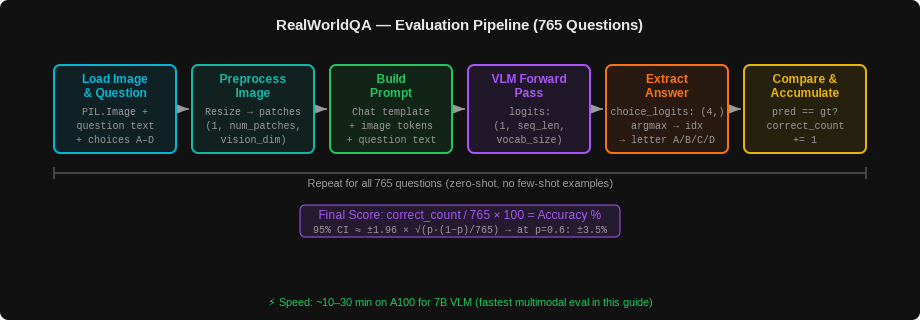 Figure 1 — RealWorldQA evaluation loop across 765 questions. Each question provides one real-world photo; the VLM processes image + question text and must select from multiple choice options. Final accuracy has a ±3.5% confidence interval at 60% accuracy.
Reference Implementation
Standalone Implementation
1
2
3
4
5
6
7
8
9
10
11
12
13
14
15
16
17
18
19
20
21
22
23
24
25
26
27
28
29
30
31
32
33
34
35
36
37
38
39
40
41
42
43
44
45
46
47
48
49
50
51
52
53
54
55
56
57
58
59
60
61
62
63
64
65
66
67
68
69
70
71
72
73
74
75
76
77
78
79
80
81
82
83
84
85
86
87
88
89
90
91
92
93
94
95
import re
import torch
from transformers import AutoProcessor, LlavaForConditionalGeneration
from datasets import load_dataset

CHOICES = ["A", "B", "C", "D"]


def format_mc_prompt(question: str, choices: list[str]) -> str:
    """Format a multiple-choice question as a prompt string."""
    choices_str = "\n".join(
        f"{chr(65 + i)}. {opt}" for i, opt in enumerate(choices)
    )
    return f"{question}\n{choices_str}\nAnswer with the letter only:"


def parse_mc_answer(text: str) -> str:
    """Extract a single letter answer (A, B, C, D) from generated text."""
    text = text.strip()
    if text and text[0] in "ABCD":
        return text[0]
    match = re.search(r"(?:answer is|answer:)\s*([A-D])", text, re.IGNORECASE)
    if match:
        return match.group(1).upper()
    match = re.search(r"[A-D]", text)
    return match.group(0) if match else "A"


def evaluate_realworldqa(
    model_id: str = "llava-hf/llava-v1.6-mistral-7b-hf",
    device: str = "cuda",
    dtype: torch.dtype = torch.bfloat16,
) -> float:
    """Evaluate a VLM on the RealWorldQA benchmark.

    Args:
        model_id: HuggingFace model identifier for a VLM.
        device: Device to run on ("cuda" or "cpu").
        dtype: Model precision.

    Returns:
        Overall accuracy as a percentage.
    """
    processor = AutoProcessor.from_pretrained(model_id)
    model = LlavaForConditionalGeneration.from_pretrained(
        model_id, torch_dtype=dtype, device_map=device
    )
    model.eval()

    dataset = load_dataset("xai-org/RealWorldQA", split="test")

    total_correct = 0
    total_questions = len(dataset)

    for i, example in enumerate(dataset):
        image = example["image"]
        question = example["question"]
        choices = example["choices"]
        answer = example["answer"]

        prompt = format_mc_prompt(question, choices)

        inputs = processor(
            text=prompt,
            images=[image],
            return_tensors="pt",
        ).to(device)
        # inputs.input_ids: (1, seq_len)
        # inputs.pixel_values: (1, 3, H, W)

        with torch.no_grad():
            output_ids = model.generate(
                **inputs,
                max_new_tokens=10,
                do_sample=False,
            )
            # output_ids: (1, input_len + gen_len)

        generated_text = processor.decode(
            output_ids[0, inputs["input_ids"].shape[1]:],
            skip_special_tokens=True,
        )

        prediction = parse_mc_answer(generated_text)
        if prediction == answer:
            total_correct += 1

        if (i + 1) % 100 == 0:
            running_acc = total_correct / (i + 1) * 100
            print(f"[{i+1}/{total_questions}] Running accuracy: {running_acc:.1f}%")

    accuracy = total_correct / total_questions * 100
    print(f"\nRealWorldQA Accuracy: {accuracy:.1f}% ({total_correct}/{total_questions})")

    return accuracy
Using VLMEvalKit
VLMEvalKit is the primary evaluation framework with native RealWorldQA support:
1
2
3
4
5
6
7
8
9
10
11
12
13
14
# Install
pip install vlmeval

# Run RealWorldQA evaluation
python run.py \
    --model llava_v1.6_7b \
    --data RealWorldQA \
    --verbose

# Run with a specific model configuration
python run.py \
    --model internvl2_8b \
    --data RealWorldQA \
    --work-dir ./results/
VLMEvalKit handles model-specific prompt formatting, image preprocessing, and answer parsing automatically for 70+ supported VLMs.
Using Direct API Calls (Commercial Models)
For evaluating commercial VLMs like GPT-4o or Claude:
1
2
3
4
5
6
7
8
9
10
11
12
13
14
15
16
17
18
19
20
21
22
23
24
25
26
27
28
29
30
31
32
33
34
35
36
37
38
39
40
41
42
43
44
45
46
47
48
49
50
51
52
53
54
import base64
import openai
from datasets import load_dataset
from io import BytesIO


def evaluate_with_api(api_key: str, model: str = "gpt-4o") -> float:
    """Evaluate a commercial VLM via API on RealWorldQA."""
    client = openai.OpenAI(api_key=api_key)
    dataset = load_dataset("xai-org/RealWorldQA", split="test")

    total_correct = 0

    for example in dataset:
        image = example["image"]
        question = example["question"]
        choices = example["choices"]
        answer = example["answer"]

        # Encode image to base64
        buffer = BytesIO()
        image.save(buffer, format="PNG")
        img_b64 = base64.b64encode(buffer.getvalue()).decode()

        # Format choices
        choices_str = "\n".join(
            f"{chr(65+i)}. {c}" for i, c in enumerate(choices)
        )
        prompt = (
            f"{question}\n{choices_str}\n"
            "Answer with just the letter (A, B, C, or D)."
        )

        response = client.chat.completions.create(
            model=model,
            messages=[{
                "role": "user",
                "content": [
                    {"type": "image_url", "image_url": {
                        "url": f"data:image/png;base64,{img_b64}"
                    }},
                    {"type": "text", "text": prompt},
                ],
            }],
            max_tokens=10,
        )

        prediction = parse_mc_answer(response.choices[0].message.content)
        if prediction == answer:
            total_correct += 1

    accuracy = total_correct / len(dataset) * 100
    print(f"RealWorldQA ({model}): {accuracy:.1f}%")
    return accuracy
Key Differences Between Frameworks
| Feature | Custom Script | VLMEvalKit | API-Based |
|---|---|---|---|
| Model coverage | Single model | 70+ VLMs | API models only |
| Prompt format | Manual | Auto per model | Manual |
| Answer parsing | Basic | Robust | Basic |
| Speed | Depends on GPU | Optimized | Rate-limited |
| Setup complexity | Low | Medium | Low |
Caveats & Pitfalls
1. Small Dataset Size
Only 765 questions — each question is worth approximately 0.13% of the total score. This makes the benchmark:
- Noisy: Score differences of 2–3% between models may be within statistical noise (see the confidence interval analysis in Formula & Intuition).
- Sensitive to individual errors: Getting just 8 more questions right raises the score by ~1%.
- Fast to evaluate: 765 forward passes take only ~10–30 minutes on an A100 for a 7B VLM, making it good for quick iteration but less statistically reliable than larger benchmarks.
2. No Official Training Split
RealWorldQA has a single evaluation set with no train or dev split. This means:
- All evaluation must be zero-shot — no few-shot examples from the benchmark itself
- No calibration data available for hyperparameter tuning
- No way to do held-out validation on RealWorldQA-specific data
3. No Formal Paper
Released without a peer-reviewed paper, so:
- The methodology behind question selection is not formally described
- Inter-annotator agreement is not reported
- Potential biases in question design are not documented
- The benchmark has not undergone the scrutiny of academic peer review
4. Image Quality Varies
Real photographs have inherent variability:
- Lighting conditions: Bright sunlight, overcast, nighttime, indoor fluorescent
- Camera angles: Straight-on, oblique, overhead, dashboard camera
- Resolution: High-resolution DSLR to low-resolution phone cameras
- Occlusion: Partially blocked objects, overlapping elements
This variability is both a strength (real-world realism) and a challenge (inconsistent difficulty).
5. Subjective Questions
Some questions may have ambiguous answers depending on interpretation:
- “Is this road safe to drive on?” — depends on the driver’s risk tolerance
- “What season is it?” — may be ambiguous from a single photograph
- Annotator disagreements are not publicly documented
6. Source Bias
Created by xAI, the benchmark may:
- Reflect the types of visual understanding xAI prioritized for Grok
- Over-represent certain scenes or question types
- Have been designed with awareness of specific model capabilities (benchmark gaming risk)
7. Limited Category Coverage
Focused on practical spatial/perceptual understanding. Does not cover:
- Abstract reasoning
- Academic knowledge (use MMMU)
- Complex multi-step reasoning
- Video understanding (temporal reasoning)
- Fine-grained object recognition (use ImageNet)
- Document understanding (use DocVQA)
8. Annotation Quality
- No formal inter-annotator agreement (Cohen’s kappa or similar) has been reported
- No published annotation guidelines
- Some community members have identified potentially incorrect labels
- Best practice: report confidence intervals alongside scores
9. Speed vs. Robustness Trade-off
| Aspect | RealWorldQA | MMMU | MMBench |
|---|---|---|---|
| Questions | 765 | 11,500 | 3,000+ |
| Eval time (7B VLM, A100) | ~10–30 min | ~2–4 hours | ~1–2 hours |
| Statistical reliability | Lower | Higher | Medium |
| Per-question impact | ~0.13% | ~0.009% | ~0.03% |
10. Answer Format Mismatch
RealWorldQA answer options are sometimes numbers, short phrases, or directional terms rather than just A/B/C/D letters. Examples:
- “How many red cars are there?” → Options: “1”, “2”, “3”, “4”
- “Is the pedestrian walking toward or away?” → Options: “Toward”, “Away”, “Can’t tell”
Some evaluation pipelines assume all answers are single letters and break when options are words or numbers. Ensure your answer extraction handles non-letter options correctly.
11. Visual Tokenization Failure (Image Not Loaded)
If an image fails to load (file not found, corrupt JPEG, download error), some frameworks silently pass a blank/zeroed image tensor to the model. The model then “answers” based on text alone, which is typically near-random for visual questions.
Always verify:
- Image download completed successfully (check
dataset["image"]is not None) - Image dimensions are valid (not 0×0 or degenerate)
- Image mode is RGB (not grayscale or RGBA, unless your model handles those)
A silent image loading failure can cause 10–20% accuracy degradation without any obvious error messages.
12. Confidence Interval vs. Effect Size
A common mistake with RealWorldQA results is claiming significant differences between models based on small score gaps. Example:
- Model A: 63.1% (480/765 correct)
- Model B: 61.4% (470/765 correct)
- Difference: 1.7% (only 10 questions)
With 765 questions, a two-proportion z-test at α=0.05 requires approximately a 4–5% gap to reach statistical significance. A 1–3% gap on RealWorldQA is statistically indistinguishable. Use RealWorldQA for rough screening, not fine-grained ranking.
13. The “Spatial Reasoning” vs. “Knowledge Recall” Distinction
RealWorldQA is designed to test visual perception, but some questions inadvertently test factual knowledge:
- “What country does this license plate format belong to?” → knowledge, not perception
- “What brand is the coffee shop?” → brand recognition (potentially knowledge-contaminated)
Be aware that models with broad world knowledge may outperform genuinely better visual perceivers on a subset of questions. When analyzing failure modes, categorize questions by whether they require pure vision or also factual recall.
Leaderboard Reference
Note: All scores below are approximate and based on publicly reported results. Scores may vary by 2–4% depending on the evaluation framework, prompt format, and image preprocessing used. The small dataset size means comparisons should be made with caution.
Small Models (<10B parameters)
| Model | Params | RealWorldQA | Notes |
|---|---|---|---|
| LLaVA-1.5-7B | 7B | ~52% | LLaVA team; CLIP ViT-L + Vicuna |
| Qwen-VL-Chat | 7B | ~49% | Alibaba; ViT-G + Qwen |
| Phi-3.5-Vision | 4.2B | ~58% | Microsoft; strong for size |
| InternVL2-8B | 8B | ~64% | Shanghai AI Lab; InternViT-6B encoder |
| LLaVA-NeXT-7B | 7B | ~55% | LLaVA team; dynamic resolution |
Medium Models (10B–30B parameters)
| Model | Params | RealWorldQA | Notes |
|---|---|---|---|
| InternVL2-26B | 26B | ~67% | Shanghai AI Lab |
| LLaVA-NeXT-34B | 34B | ~63% | LLaVA team; Yi-34B backbone |
| CogVLM2-19B | 19B | ~60% | Tsinghua; CogAgent-based |
Large Models (30B+ parameters)
| Model | Params | RealWorldQA | Notes |
|---|---|---|---|
| Grok-1.5V | Unknown | ~68% | xAI; created the benchmark |
| Gemini 1.5 Pro | Unknown | ~70% | Google; long-context multimodal |
| Claude 3.5 Sonnet | Unknown | ~72% | Anthropic |
| GPT-4o | Unknown | ~75% | OpenAI; strongest overall |
Score Interpretation Guide
Parameters: Deep Dive
RealWorldQA is simpler to configure than MMMU (only 1 image per question, no few-shot), but parameter choices still matter for reproducibility and fairness.
image_resolution (Processing Resolution)
Why it exists: RealWorldQA images are real photographs that may contain small text (road signs, labels, meters), fine spatial details (counting objects, detecting proximity), and varying field-of-view distances. Resolution determines whether these details are preserved.
Values: Model-dependent (see table below)
| Model | Default Resolution | Tokens per Image | Recommended |
|---|---|---|---|
| LLaVA-1.5 | 336×336 | 576 | Minimum viable |
| LLaVA-NeXT | Up to 1344×336 (tiled) | ~2,880 | Good for text-heavy Q |
| InternVL2-8B | Up to 448×448 | ~1,024 | Good balance |
| Qwen2-VL | Dynamic (up to 1280px) | ~256–2,048 | Best for details |
| Phi-3.5-Vision | 336×336 (HD mode) | ~1,024–2,016 | Good |
Why it matters for RealWorldQA specifically:
- Sign reading questions: “What does the road sign say?” — requires sufficient resolution to read text. Low-resolution (224px) models fail on text-heavy questions.
- Counting questions: “How many cars are parked?” — object separation requires decent resolution.
- Spatial questions: “Is the bike to the left or right of the car?” — generally resolution-independent.
Impact: High-resolution vs. low-resolution can differ by 4–8% on RealWorldQA, more than on text-heavy benchmarks like MMMU (where questions are often about diagram concepts, not fine details).
Pitfall: A model that reports 62% with high-resolution tiling but 55% with standard resolution is not comparable to another model reporting 58% at standard resolution. Always report the processing resolution.
method (Log-Likelihood vs. Generation)
Why it exists: Two strategies for extracting the model’s answer from a multiple-choice prompt.
Log-likelihood method:
- Compute the logit for tokens A, B, C, D at the last position
- Answer = argmax(logits[A], logits[B], logits[C], logits[D])
- Single forward pass, deterministic, fast
Generation method:
- Autoregressively generate a short response
- Parse the first letter from the output
- Slightly slower, but may work better for instruct-tuned models
Impact: For RealWorldQA specifically:
- Log-likelihood: works well for base and instruction-tuned models
- Generation: better for models trained with instruction-following objectives that produce “The answer is B” style outputs
- Difference: typically 1–4% between methods for the same model
Recommendation: Use generation for instruct models with max_new_tokens=5–10. Use log-likelihood for base models. Report which method was used.
prompt_template
Why it exists: RealWorldQA has no canonical prompt template (unlike MMLU, which has an official format). Each framework and model uses slightly different wording.
Common templates:
1
2
3
4
5
6
7
8
# Template 1: Simple
prompt = f"{question}\nA. {choices[0]}\nB. {choices[1]}\nC. {choices[2]}\nD. {choices[3]}\nAnswer:"

# Template 2: With instruction
prompt = f"Look at the image and answer the following question.\n{question}\nA. {choices[0]}\nB. {choices[1]}\nC. {choices[2]}\nD. {choices[3]}\nAnswer:"

# Template 3: Chat format (for instruct models)
prompt = f"<image>\nQuestion: {question}\nOptions: A. {choices[0]}, B. {choices[1]}, C. {choices[2]}, D. {choices[3]}\nSelect the best answer."
Impact: Template variations can affect accuracy by 2–5% for instruct models. Base models are typically less sensitive to minor wording changes.
Pitfall: Forgetting to include the image reference (<image> token or equivalent) in the prompt causes the model to ignore visual input and answer from text alone → near-random performance on visual questions.
max_new_tokens
Why it exists: When using the generation method, this caps how many tokens the model generates before stopping.
Values: 1–100
| max_new_tokens | Effect | Speed |
|---|---|---|
| 1 | Only single-token answer (letter) | Fastest |
| 5–10 | Short answers: “B” or “The answer is B” | Fast |
| 50–100 | Allow brief explanation before answer | Slower |
Pitfall: Setting max_new_tokens=1 forces a single-token generation. For models that output “The answer is” before the letter, this truncates the response and may produce a non-answer token (e.g., “The”). Use at least 5–10 tokens and parse the first answer letter from the output.
do_sample (Sampling vs. Greedy)
Why it exists: Controls whether the model samples from the probability distribution or picks the highest-probability token at each step.
Values: False (greedy decoding), True (sampling with temperature)
| do_sample | Effect | Reproducibility |
|---|---|---|
| False (greedy) | Deterministic, single most-likely output | ✓ Fully reproducible |
| True (temperature) | Stochastic, varies across runs | ✗ Non-deterministic |
Recommendation: Always use do_sample=False (greedy) for evaluation. This ensures reproducibility — running the same evaluation twice gives the same score. With sampling, you’d need to average over multiple runs to get a stable estimate.
Pitfall: Some model inference APIs default to sampling (temperature > 0). Always explicitly set do_sample=False or temperature=0 for eval runs.
batch_size
Why it exists: Processing multiple images in parallel improves GPU throughput.
Values: 1, 4, 8, 16, auto
Advantage of RealWorldQA: Every question has exactly 1 image of relatively consistent resolution (unlike MMMU with 1–7 variable images). This makes batching straightforward.
| batch_size | Speed | Accuracy | Notes |
|---|---|---|---|
| 1 | Baseline | Exact | Reference |
| 4 | ~3× faster | Identical | Good balance |
| 8 | ~5× faster | Identical | May OOM for large models |
| 16 | ~7× faster | Identical | Large GPU only |
Recommendation: Use batch_size=4–8 for efficiency. Accuracy is identical since each question is processed independently.
confidence_interval Reporting
Why it matters: With only 765 questions, RealWorldQA results have substantial statistical uncertainty. Each question is worth 0.13% of the score.
95% Confidence Interval formula:
\[\text{CI}_{95} = \pm 1.96 \times \sqrt{\frac{p(1-p)}{n}}\]| Accuracy (p) | n=765 | CI (95%) | Practical Meaning |
|---|---|---|---|
| 50% | 765 | ±3.5% | Models within 7% of each other may not differ significantly |
| 60% | 765 | ±3.5% | Same |
| 70% | 765 | ±3.3% | Same |
Pitfall: Reporting RealWorldQA scores without confidence intervals overstates the precision of the comparison. A 2% difference between models is statistically meaningless at 765 questions. Always report CIs or at minimum acknowledge the small dataset size.
Summary: Parameter Impact Matrix
| Parameter | Effect on Accuracy | Effect on Speed | Recommendation |
|---|---|---|---|
image_resolution ↑ |
+2–8% on detail Q | Slower | Model’s native resolution |
method: log-lik vs generate |
±1–4% | Generate is slower | Log-lik for base, generate for instruct |
prompt_template |
±2–5% | Minimal | Report exact template |
max_new_tokens (generate) |
May truncate | Higher = slower | 5–10 for MC answers |
do_sample=False |
Deterministic | Faster | Always False for eval |
batch_size ↑ |
No change | Faster | 4–8 recommended |
Applicability
Complementary Benchmarks
RealWorldQA is best used alongside other benchmarks for a complete picture of VLM capabilities:
| Skill | Benchmark | Complements RealWorldQA by… |
|---|---|---|
| Academic multimodal knowledge | MMMU | Testing expert-level visual reasoning (diagrams, charts, scans) |
| Text-only knowledge | MMLU | Testing pure language knowledge without visual requirements |
| Comprehensive VLM eval | MMBench | Broader coverage of VLM capabilities beyond spatial perception |
| Chart understanding | ChartQA | Focused deep-dive into chart and graph comprehension |
| Document understanding | DocVQA | Testing OCR and document layout understanding |
| Hallucination detection | POPE, HallusionBench | Testing whether VLMs fabricate visual content |
| Mathematical reasoning | MathVista | Multimodal math-specific evaluation |
Common Eval Sources
VLMEvalKit (OpenCompass)
The primary evaluation framework with native RealWorldQA support:
1
2
pip install vlmeval
python run.py --model <model_name> --data RealWorldQA
Supports 70+ VLMs and handles model-specific prompt formatting, image preprocessing, and answer parsing. This is the recommended framework for running RealWorldQA evaluations.
OpenCompass
A comprehensive evaluation platform that includes RealWorldQA:
- Website: opencompass.org.cn
- Supports: Both text-only and multimodal models
- Provides: Standardized evaluation protocols and public leaderboards
Custom Scripts
Given the small dataset size (765 questions) and simple format (1 image, 1 question, multiple choices), RealWorldQA is straightforward to implement from scratch. The standalone implementation in the Reference Implementation section above is a complete working example.
lm-eval-harness (EleutherAI)
VLM support in lm-eval-harness is under active development. Check the framework’s documentation for the latest list of supported multimodal benchmarks and VLM backends.
Links & References
Dataset
- RealWorldQA on HuggingFace — canonical dataset on the HuggingFace Hub.
Evaluation Frameworks
- VLMEvalKit — OpenCompass VLM evaluation toolkit; primary framework for RealWorldQA.
- OpenCompass — comprehensive evaluation platform including RealWorldQA.
- lm-eval-harness — EleutherAI’s evaluation framework; VLM support growing.
Related Benchmarks
- MMMU — academic multimodal reasoning across 30 subjects.
- MMBench — comprehensive VLM benchmark with fine-grained ability dimensions.
- SEED-Bench — large-scale multimodal understanding and generation evaluation.
Leaderboards
- Open VLM Leaderboard — community leaderboard for VLMs including RealWorldQA scores.
← Previous: 03 — MMMU · Back to Table of Contents →
Last updated: April 2026