03 — MMMU
Introduction
MMMU stands for Massive Multi-discipline Multimodal Understanding. It is the first benchmark designed to evaluate vision-language models (VLMs) on expert-level, college-course tasks that require understanding visual content — diagrams, charts, chemical structures, medical scans, musical scores, architectural drawings, and more. While MMLU tests textual knowledge across 57 subjects, MMMU tests multimodal knowledge across 30 subjects spanning six core disciplines, making it the visual counterpart to MMLU.
Source: Xiang Yue, Yuansheng Ni et al. at IN.AI Research and multiple universities (Carnegie Mellon, University of Waterloo, etc.).
Paper: “MMMU: A Massive Multi-discipline Multimodal Understanding and Reasoning Benchmark for Expert AGI” (CVPR 2024).
Primary metric: Accuracy (%) — the percentage of questions answered correctly. Higher is better.
What MMMU measures: Given a question containing one or more images alongside text and (for multiple-choice) a set of answer options, the model must select the correct answer or generate a short free-form response. Questions are sourced from real college exams and textbooks, verified by subject-matter experts, and span difficulty levels from introductory undergraduate to advanced graduate courses.
- 11,500 questions from 30 subjects across 6 core disciplines.
- Multimodal by design — every question requires understanding at least one image. Text-only models cannot meaningfully complete this benchmark.
- Multiple-choice (the majority) and open-ended question formats.
- 1–7 images per question — some questions present a single diagram, others require reasoning across multiple figures, charts, or photographs simultaneously.
- Random baseline: ~25% for standard 4-choice multiple-choice questions; varies for other formats.
- A model scoring 25% has no multimodal understanding; a model scoring 60%+ demonstrates strong expert-level visual reasoning.
Formula & Intuition
The Core Metric
MMMU accuracy is conceptually identical to MMLU — count correct answers and divide by total questions:
\[\text{Accuracy} = \frac{\text{Number Correct}}{\text{Total Questions}} \times 100\%\]For MMMU’s 900 validation questions, if a model gets 432 correct:
\[\text{Accuracy} = \frac{432}{900} \times 100\% = 48.0\%\]Per-subject and per-discipline accuracy are computed the same way, aggregated over the relevant subset of questions:
\[\text{Accuracy}_{\text{subject}} = \frac{\text{Correct in subject}}{\text{Total in subject}} \times 100\%\] \[\text{Accuracy}_{\text{discipline}} = \frac{1}{|\mathcal{S}_d|} \sum_{s \in \mathcal{S}_d} \text{Accuracy}_s\]where $\mathcal{S}_d$ is the set of subjects in discipline $d$.
How the Model Picks an Answer
There are two question types in MMMU, each requiring a different evaluation approach:
Key Difference from MMLU
The fundamental difference is the image input. In MMLU, the model receives only text tokens. In MMMU, the model must process both text and image tokens:
\[\text{MMLU input}: \quad \mathbf{x} = [x_1^{\text{text}}, x_2^{\text{text}}, \ldots, x_T^{\text{text}}]\] \[\text{MMMU input}: \quad \mathbf{x} = [x_1^{\text{img}}, \ldots, x_P^{\text{img}}, x_1^{\text{text}}, \ldots, x_T^{\text{text}}]\]where $P$ is the number of image tokens (typically hundreds per image) and $T$ is the number of text tokens. The image tokens are produced by a vision encoder (e.g., CLIP ViT) and projected into the language model’s embedding space.
A text-only model has no mechanism to process image tokens, which is why text-only models score near random (~25%) on MMMU.
Normalized Accuracy
Similar to MMLU, some papers report a normalized accuracy to account for the random baseline:
\[\text{Normalized Accuracy} = \frac{\text{Accuracy} - \text{Baseline}}{100 - \text{Baseline}} \times 100\%\]For 4-choice questions (baseline = 25%):
\[\text{Normalized Accuracy} = \frac{\text{Accuracy} - 25}{75} \times 100\%\]Dataset Details
Quantitative Overview
| Split | Purpose | Questions | Notes |
|---|---|---|---|
| Dev | Few-shot exemplars | 150 (5 per subject) | Used as in-context examples; never evaluated |
| Validation | Development testing | 900 (30 per subject) | Most reported scores use this split |
| Test | Final evaluation | 10,500 | Hidden labels; requires leaderboard submission |
| Total | — | 11,550 | Across all splits |
Subject-Level Detail
All 30 subjects organized by their 6 parent disciplines:
| # | Subject | Discipline | Approx. Questions |
|---|---|---|---|
| 1 | Art | Art & Design | ~390 |
| 2 | Art Theory | Art & Design | ~390 |
| 3 | Design | Art & Design | ~390 |
| 4 | Music | Art & Design | ~390 |
| 5 | Accounting | Business | ~390 |
| 6 | Economics | Business | ~390 |
| 7 | Finance | Business | ~390 |
| 8 | Management | Business | ~390 |
| 9 | Marketing | Business | ~390 |
| 10 | Biology | Science | ~390 |
| 11 | Chemistry | Science | ~390 |
| 12 | Geography | Science | ~390 |
| 13 | Math | Science | ~390 |
| 14 | Physics | Science | ~390 |
| 15 | Basic Medical Science | Health & Medicine | ~390 |
| 16 | Clinical Medicine | Health & Medicine | ~390 |
| 17 | Diagnostics & Lab Medicine | Health & Medicine | ~390 |
| 18 | Pharmacy | Health & Medicine | ~390 |
| 19 | Public Health | Health & Medicine | ~390 |
| 20 | History | Humanities & Social Science | ~390 |
| 21 | Literature | Humanities & Social Science | ~390 |
| 22 | Psychology | Humanities & Social Science | ~390 |
| 23 | Sociology | Humanities & Social Science | ~390 |
| 24 | Agriculture | Tech & Engineering | ~390 |
| 25 | Architecture & Engineering | Tech & Engineering | ~390 |
| 26 | Computer Science | Tech & Engineering | ~390 |
| 27 | Electronics | Tech & Engineering | ~390 |
| 28 | Energy & Power | Tech & Engineering | ~390 |
| 29 | Materials | Tech & Engineering | ~390 |
| 30 | Mechanical Engineering | Tech & Engineering | ~390 |
Note: Questions are approximately evenly distributed across subjects (~30 per subject in validation, ~350 per subject in test), though exact counts vary slightly.
Question Format
MMMU questions come in two formats:
Multiple-choice (the majority):
1
2
3
4
5
6
7
<image_1> [optional: <image_2>, ...]
Question: <question text referencing the image(s)>
A. <choice A>
B. <choice B>
C. <choice C>
D. <choice D>
Answer: <correct letter>
Open-ended:
1
2
3
<image_1> [optional: <image_2>, ...]
Question: <question text referencing the image(s)>
Answer: <short text answer>
Questions range from identifying elements in a painting to computing values from a circuit diagram to diagnosing a condition from a medical scan.
Image Types
MMMU contains a rich diversity of visual content:
| Image Type | Example Disciplines | Description |
|---|---|---|
| Diagrams | Science, Engineering | Flowcharts, process diagrams, system architectures |
| Charts & Graphs | Business, Science | Bar charts, line graphs, scatter plots, pie charts |
| Tables (as images) | All | Tabular data rendered as images rather than text |
| Photographs | Art, Medicine, Geography | Paintings, medical photographs, satellite imagery |
| Chemical Structures | Chemistry, Pharmacy | Molecular diagrams, reaction pathways, structural formulas |
| Medical Scans | Health & Medicine | X-rays, CT scans, MRI images, histology slides |
| Musical Scores | Music | Sheet music, musical notation |
| Architectural Drawings | Architecture & Engineering | Floor plans, elevations, CAD renderings |
| Circuit Diagrams | Electronics, Physics | Electrical schematics, logic gates |
| Maps | Geography, History | Topographic maps, historical maps, political maps |
| Mathematical Figures | Math, Physics | Geometric constructions, function plots, coordinate diagrams |
Images per Question
| Images | Description |
|---|---|
| 1 image | Most common — single diagram, chart, or photograph |
| 2 images | Side-by-side comparison, before/after, or complementary views |
| 3–5 images | Multi-figure questions requiring synthesis across multiple visuals |
| 6–7 images | Rare — complex questions with many subfigures or a sequence of images |
Loading the Dataset
1
2
3
4
5
6
7
8
9
10
11
12
13
14
15
16
17
from datasets import load_dataset

# Load a specific subject
dataset = load_dataset("MMMU/MMMU", "Accounting", split="validation")

# Each example has:
#   "id": str — unique identifier
#   "question": str — question text (may contain <image_1>, <image_2> placeholders)
#   "options": str — JSON-encoded list of choices (for MC) or empty for open-ended
#   "answer": str — correct answer letter or text
#   "image_1" through "image_7": PIL.Image or None
#   "question_type": str — "multiple-choice" or "open"
#   "subfield": str — specific topic within the subject

print(dataset[0]["question"])
print(dataset[0]["options"])
print(dataset[0]["image_1"])  # PIL.Image object
HuggingFace dataset identifier:
MMMU/MMMUwith configs for each of the 30 subjects (e.g.,"Accounting","Art","Biology","Chemistry", etc.).
MMMU-Pro: The Harder Successor
MMMU-Pro (Yue et al., 2024) is a more challenging extension of MMMU with several key improvements:
- 10 answer choices (A through J) instead of 4, reducing the random baseline from 25% to 10%
- Augmented vision-only questions — some questions require extracting information that was previously in the text from images, testing genuine visual understanding
- Three evaluation settings: Standard, Vision (text info moved into images), and a combined setting
- Designed to better discriminate among frontier models that score similarly on the original MMMU
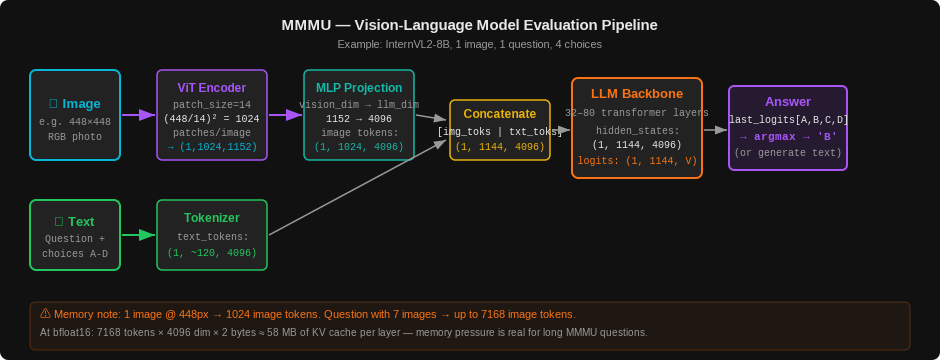 Figure 1 — The MMMU evaluation pipeline: images pass through a ViT encoder and MLP projection to produce image tokens, which are concatenated with text tokens before the LLM backbone. The model answers from final-position logits (MC) or via generation (open-ended).
Tensor Shapes at Every Stage
This section walks through the complete VLM evaluation pipeline with concrete tensor shapes at every step. We use a typical VLM architecture (e.g., LLaVA-style: CLIP ViT-L/14 vision encoder + LLaMA language model) as a concrete example.
1
2
3
4
5
6
7
8
9
10
11
12
13
14
15
16
17
18
19
20
21
22
23
24
25
26
27
28
29
30
31
32
33
34
35
36
37
38
39
40
41
42
43
44
45
46
47
48
49
50
51
52
53
54
55
56
57
58
59
60
61
62
63
64
65
66
67
68
69
70
71
72
73
74
75
76
77
78
79
80
81
82
83
84
85
86
87
88
89
90
91
92
93
94
95
96
97
98
99
100
101
102
103
104
105
106
107
108
109
110
111
112
113
114
115
116
117
118
119
120
121
122
123
124
125
126
127
128
129
130
131
132
133
134
135
136
137
138
139
140
141
142
143
144
145
146
147
┌─────────────────────────────────────────────────────────────────┐
│ Step 1: Load question                                           │
│                                                                 │
│ question_text: str          # e.g., "In the figure below..."   │
│ images: List[PIL.Image]     # 1–7 images per question          │
│   len(images) = k           # e.g., k = 2                      │
│ choices: List[str]          # typically 4 choices for MC        │
│   len(choices) = C          # e.g., C = 4                      │
│ question_type: str          # "multiple-choice" or "open"      │
└───────────────────────────────┬─────────────────────────────────┘
                                │
                                ▼
┌─────────────────────────────────────────────────────────────────┐
│ Step 2: Process images through vision encoder                   │
│                                                                 │
│ For a ViT-based vision encoder (e.g., CLIP ViT-L/14 @ 336px): │
│                                                                 │
│   Per image:                                                    │
│     raw_image: PIL.Image    # arbitrary resolution              │
│     resized: (3, 336, 336)  # RGB, resized/cropped to 336×336  │
│     patch_size: 14                                              │
│     num_patches: (336/14)² = 576 patches per image              │
│                                                                 │
│   After ViT forward pass (per image):                           │
│     patch_embeddings: (576, vision_hidden_dim)  # (576, 1024)  │
│                                                                 │
│   For k images stacked:                                         │
│     image_features: (k, 576, 1024)  # e.g., (2, 576, 1024)    │
│                                                                 │
│   After linear projection to LLM hidden dim:                    │
│     projected: (k, 576, llm_hidden_dim) # e.g., (2, 576, 4096)│
│                                                                 │
│   Flattened into a single token sequence:                       │
│     image_tokens: (k × 576,) = (1152,)  # for 2 images        │
│     image_embeds: (1, 1152, 4096)        # ready for LLM      │
│                                                                 │
│   Note: Some models (e.g., Qwen-VL) use dynamic resolution     │
│   and may produce varying numbers of tokens per image.          │
└───────────────────────────────┬─────────────────────────────────┘
                                │
                                ▼
┌─────────────────────────────────────────────────────────────────┐
│ Step 3: Tokenize text and construct combined input              │
│                                                                 │
│ Text tokenization:                                              │
│   text = "Question: In the figure... A. ... B. ... Answer:"    │
│   text_ids: (1, text_len)      # e.g., (1, 200)               │
│   text_embeds: (1, 200, 4096)  # after embedding lookup        │
│                                                                 │
│ Combine image and text embeddings:                              │
│   # Image tokens inserted at <image> placeholder positions      │
│   combined_embeds: (1, text_len + num_image_tokens, hidden_dim)│
│                  = (1, 200 + 1152, 4096)                        │
│                  = (1, 1352, 4096)                               │
│                                                                 │
│ Attention mask:                                                 │
│   attention_mask: (1, 1352)    # all ones (no padding)          │
│                                                                 │
│ Total sequence length = text tokens + image tokens              │
│   For 2 images:   200 + 2×576 = 1352 tokens                    │
│   For 7 images:   200 + 7×576 = 4232 tokens                    │
└───────────────────────────────┬─────────────────────────────────┘
                                │
                                ▼
┌─────────────────────────────────────────────────────────────────┐
│ Step 4: Forward pass through the VLM (language model)           │
│                                                                 │
│ Input embeddings: (1, 1352, 4096)                               │
│                                                                 │
│ Through transformer layers (e.g., 32 layers for a 7B model):   │
│   layer_0_out:  (1, 1352, 4096)                                 │
│   layer_1_out:  (1, 1352, 4096)                                 │
│   ...                                                           │
│   layer_31_out: (1, 1352, 4096)                                 │
│                                                                 │
│ LM head projection:                                             │
│   logits: (1, 1352, vocab_size)  # e.g., (1, 1352, 128256)    │
│                                                                 │
│ This is a large tensor:                                         │
│   1 × 1352 × 128,256 = ~173M floats                            │
│   At bfloat16: ~346 MB for this single question                │
│                                                                 │
│ Note: With 7 images, seq_len could be 4232+, pushing the       │
│ tensor to 1 × 4232 × 128,256 = ~542M floats (~1.1 GB)         │
└───────────────────────────────┬─────────────────────────────────┘
                                │
                                ▼
┌─────────────────────────────────────────────────────────────────┐
│ Step 5: Extract prediction                                      │
│                                                                 │
│ ── Multiple-Choice Mode ──                                      │
│                                                                 │
│ last_token_logits = logits[0, -1, :]                            │
│ last_token_logits: (128256,)                                    │
│                                                                 │
│ choice_token_ids: (4,)  # token IDs for "A", "B", "C", "D"    │
│ choice_logits = last_token_logits[choice_token_ids]             │
│ choice_logits: (4,)     # e.g., tensor([1.2, 4.8, 0.3, -1.1]) │
│                                                                 │
│ prediction = argmax(choice_logits)                              │
│ prediction: scalar (int)  # 0=A, 1=B, 2=C, 3=D                │
│ # In our example: argmax = 1, so model predicts "B"            │
│                                                                 │
│ ── Open-Ended Mode ──                                           │
│                                                                 │
│ Generated autoregressively:                                     │
│   output_ids: (1, gen_len)  # e.g., (1, 15) for short answer  │
│   decoded_text: str         # e.g., "42" or "hydrogen bonding" │
│                                                                 │
│ Parsed answer: str          # extracted from generated text     │
│ Match with ground truth via exact match or fuzzy comparison     │
└───────────────────────────────┬─────────────────────────────────┘
                                │
                                ▼
┌─────────────────────────────────────────────────────────────────┐
│ Step 6: Compare with ground truth                               │
│                                                                 │
│ ground_truth: str           # "B" for MC, or "42" for open     │
│                                                                 │
│ For MC:                                                         │
│   correct = (predicted_letter == ground_truth)                  │
│   correct: bool                                                 │
│                                                                 │
│ For open-ended:                                                 │
│   correct = fuzzy_match(parsed_answer, ground_truth)            │
│   correct: bool                                                 │
└───────────────────────────────┬─────────────────────────────────┘
                                │
                                ▼
┌─────────────────────────────────────────────────────────────────┐
│ Step 7: Aggregate over all questions                            │
│                                                                 │
│ For validation split (900 questions):                           │
│   all_correct: (900,)               # boolean array             │
│   total_correct = sum(all_correct)                              │
│   total_correct: scalar (int)       # e.g., 432                │
│                                                                 │
│   overall_accuracy = total_correct / 900 × 100                  │
│   overall_accuracy: scalar (float)  # e.g., 48.0%              │
│                                                                 │
│ Per-subject (30 subjects, ~30 questions each in val):           │
│   per_subject_accuracy: dict[str, float]                        │
│                                                                 │
│ Per-discipline (6 disciplines):                                 │
│   per_discipline_accuracy: dict[str, float]                     │
│     # mean of subject accuracies within each discipline         │
└─────────────────────────────────────────────────────────────────┘
Vision Encoder Variants and Token Counts
Different VLMs use different vision encoders, which affects the number of image tokens and therefore the total sequence length and memory cost:
| Vision Encoder | Input Resolution | Patch Size | Tokens per Image | Example VLMs |
|---|---|---|---|---|
| CLIP ViT-L/14 | 224×224 | 14 | 256 | LLaVA-1.5 |
| CLIP ViT-L/14 | 336×336 | 14 | 576 | LLaVA-1.5 (high-res) |
| SigLIP-SO400M | 384×384 | 14 | 729 | PaliGemma |
| InternViT-6B | 448×448 | 14 | 1024 | InternVL2 |
| Qwen-VL ViT | Dynamic | 14 | 256–1280 | Qwen-VL, Qwen2-VL |
| CLIP ViT-L/14 (multi-crop) | 336×336 × N crops | 14 | 576 × N | LLaVA-NeXT |
Impact on MMMU: A question with 4 images on a model using 576 tokens/image adds 2,304 image tokens to the sequence. With LLaVA-NeXT’s multi-crop (up to 5 crops per image), this could exceed 11,520 image tokens — requiring significant context length and memory.
Shape Transformation Summary
| Stage | Shape | Example |
|---|---|---|
| Raw image (per image) | (3, H, W) |
(3, 336, 336) |
| ViT patches (per image) | (num_patches, vision_dim) |
(576, 1024) |
| Projected image tokens (per image) | (num_patches, llm_dim) |
(576, 4096) |
| All image tokens (k images) | (k × num_patches, llm_dim) |
(1152, 4096) |
| Text tokens | (1, text_len) |
(1, 200) |
| Combined input | (1, total_len, llm_dim) |
(1, 1352, 4096) |
| Logits | (1, total_len, vocab_size) |
(1, 1352, 128256) |
| Choice logits (MC) | (num_choices,) |
(4,) |
| Prediction | scalar | 1 (= “B”) |
Evaluation Procedure (Pseudocode)
1
2
3
4
5
6
7
8
9
10
11
12
13
14
15
16
17
18
19
20
21
22
23
24
25
26
27
28
29
30
31
32
33
34
35
36
37
38
39
40
41
42
43
44
45
46
47
48
49
50
51
52
53
54
55
56
57
58
59
60
61
62
63
64
65
66
67
68
69
70
71
72
73
74
75
76
77
78
79
80
81
82
83
84
85
86
87
88
89
90
91
92
93
94
95
96
97
98
99
100
101
102
103
104
105
106
107
108
109
110
111
112
113
114
115
116
117
118
119
120
121
122
123
124
125
126
127
128
129
130
131
132
133
134
135
136
137
138
139
140
141
142
143
144
145
146
147
148
149
150
151
152
153
154
155
156
157
FUNCTION evaluate_mmmu(model, processor, split="validation"):
    subjects ← list of all 30 MMMU subjects
    subject_scores ← empty dict
    discipline_scores ← empty dict
    total_correct ← 0
    total_questions ← 0

    FOR each subject IN subjects:
        # Load data
        dataset ← load("MMMU/MMMU", subject, split=split)

        subject_correct ← 0

        FOR each example IN dataset:
            # Step 1: Extract question components
            question_text ← example["question"]
            question_type ← example["question_type"]
            answer ← example["answer"]

            # Collect all images (up to 7)
            images ← []
            FOR i FROM 1 TO 7:
                img ← example[f"image_{i}"]
                IF img IS NOT None:
                    images.append(img)
            END FOR

            # Parse options for multiple-choice
            IF question_type == "multiple-choice":
                options ← json.loads(example["options"])
            END IF

            # Step 2: Construct prompt
            IF question_type == "multiple-choice":
                prompt ← format_mc_prompt(question_text, options)
                # e.g., "<image>\nQuestion: ... \nA. ... B. ... C. ... D. ...\nAnswer:"
            ELSE:
                prompt ← format_open_prompt(question_text)
                # e.g., "<image>\nQuestion: ...\nAnswer (short):"
            END IF

            # Step 3: Process inputs (text + images)
            inputs ← processor(
                text=prompt,
                images=images,
                return_tensors="pt"
            ).to(device)
            # inputs contains:
            #   input_ids: (1, seq_len)
            #   pixel_values: (k, 3, H, W)
            #   attention_mask: (1, seq_len)

            # Step 4: Forward pass
            WITH torch.no_grad():
                IF question_type == "multiple-choice":
                    outputs ← model(**inputs)
                    logits ← outputs.logits      # (1, seq_len, vocab_size)

                    # Extract choice logits
                    last_logits ← logits[0, -1, :]  # (vocab_size,)
                    choice_ids ← get_choice_token_ids(processor.tokenizer)
                    choice_logits ← last_logits[choice_ids]  # (4,)

                    prediction ← CHOICES[argmax(choice_logits)]
                    # prediction: str, e.g., "B"

                ELSE:  # open-ended
                    output_ids ← model.generate(
                        **inputs,
                        max_new_tokens=50,
                        do_sample=False
                    )
                    # output_ids: (1, input_len + gen_len)

                    generated_text ← processor.decode(
                        output_ids[0, inputs.input_ids.shape[1]:]
                    )
                    prediction ← parse_open_answer(generated_text)
                END IF

            # Step 5: Check correctness
            IF question_type == "multiple-choice":
                correct ← (prediction == answer)
            ELSE:
                correct ← fuzzy_match(prediction, answer)
            END IF

            IF correct:
                subject_correct += 1
        END FOR

        # Record subject accuracy
        subject_scores[subject] ← subject_correct / len(dataset) × 100
        total_correct += subject_correct
        total_questions += len(dataset)

        PRINT f"{subject}: {subject_scores[subject]:.1f}%"
              + f" ({subject_correct}/{len(dataset)})"
    END FOR

    # Aggregate by discipline
    disciplines ← {
        "Art & Design": ["Art", "Art_Theory", "Design", "Music"],
        "Business": ["Accounting", "Economics", "Finance", "Manage", "Marketing"],
        "Science": ["Biology", "Chemistry", "Geography", "Math", "Physics"],
        "Health & Medicine": ["Basic_Medical_Science", "Clinical_Medicine",
                              "Diagnostics_and_Laboratory_Medicine", "Pharmacy",
                              "Public_Health"],
        "Humanities & Social Science": ["History", "Literature", "Psychology",
                                         "Sociology"],
        "Tech & Engineering": ["Agriculture", "Architecture_and_Engineering",
                                "Computer_Science", "Electronics",
                                "Energy_and_Power", "Materials",
                                "Mechanical_Engineering"]
    }

    FOR each discipline, disc_subjects IN disciplines:
        disc_accs ← [subject_scores[s] for s in disc_subjects]
        discipline_scores[discipline] ← mean(disc_accs)
        PRINT f"{discipline}: {discipline_scores[discipline]:.1f}%"
    END FOR

    overall ← total_correct / total_questions × 100
    PRINT f"Overall: {overall:.1f}%"

    RETURN overall, subject_scores, discipline_scores


FUNCTION format_mc_prompt(question_text, options):
    choices_str ← ""
    FOR i, option IN enumerate(options):
        choices_str += f"{chr(65+i)}. {option}\n"
    RETURN f"{question_text}\n{choices_str}Answer:"


FUNCTION format_open_prompt(question_text):
    RETURN f"{question_text}\nAnswer the question with a short phrase or value:"


FUNCTION fuzzy_match(prediction, ground_truth):
    # Normalize both strings: lowercase, strip whitespace, remove articles
    pred_norm ← normalize(prediction)
    gt_norm ← normalize(ground_truth)

    # Try exact match first
    IF pred_norm == gt_norm:
        RETURN True

    # Try numeric comparison (for math/science answers)
    IF is_numeric(pred_norm) AND is_numeric(gt_norm):
        RETURN abs(float(pred_norm) - float(gt_norm)) < 1e-3

    # Try containment (ground truth appears in prediction)
    IF gt_norm IN pred_norm:
        RETURN True

    RETURN False
Reference Implementation
Standalone Implementation
1
2
3
4
5
6
7
8
9
10
11
12
13
14
15
16
17
18
19
20
21
22
23
24
25
26
27
28
29
30
31
32
33
34
35
36
37
38
39
40
41
42
43
44
45
46
47
48
49
50
51
52
53
54
55
56
57
58
59
60
61
62
63
64
65
66
67
68
69
70
71
72
73
74
75
76
77
78
79
80
81
82
83
84
85
86
87
88
89
90
91
92
93
94
95
96
97
98
99
100
101
102
103
104
105
106
107
108
109
110
111
112
113
114
115
116
117
118
119
120
121
122
123
124
125
126
127
128
129
130
131
132
133
134
135
136
137
138
139
140
141
142
143
144
145
146
147
148
149
150
151
152
153
154
155
156
157
158
159
160
161
162
163
164
165
166
167
168
169
170
171
172
173
174
175
176
177
178
179
180
181
182
183
184
185
186
187
188
189
190
191
192
import json
import re
import torch
from transformers import AutoProcessor, LlavaForConditionalGeneration
from datasets import load_dataset

SUBJECTS = [
    "Accounting", "Agriculture", "Architecture_and_Engineering", "Art",
    "Art_Theory", "Basic_Medical_Science", "Biology", "Chemistry",
    "Clinical_Medicine", "Computer_Science", "Design",
    "Diagnostics_and_Laboratory_Medicine", "Economics", "Electronics",
    "Energy_and_Power", "Finance", "Geography", "History", "Literature",
    "Manage", "Marketing", "Materials", "Math", "Mechanical_Engineering",
    "Music", "Pharmacy", "Physics", "Psychology", "Public_Health",
    "Sociology",
]

CHOICES = ["A", "B", "C", "D"]

DISCIPLINES = {
    "Art & Design": ["Art", "Art_Theory", "Design", "Music"],
    "Business": ["Accounting", "Economics", "Finance", "Manage", "Marketing"],
    "Science": ["Biology", "Chemistry", "Geography", "Math", "Physics"],
    "Health & Medicine": [
        "Basic_Medical_Science", "Clinical_Medicine",
        "Diagnostics_and_Laboratory_Medicine", "Pharmacy", "Public_Health",
    ],
    "Humanities & Social Science": [
        "History", "Literature", "Psychology", "Sociology",
    ],
    "Tech & Engineering": [
        "Agriculture", "Architecture_and_Engineering", "Computer_Science",
        "Electronics", "Energy_and_Power", "Materials",
        "Mechanical_Engineering",
    ],
}


def collect_images(example: dict) -> list:
    """Collect all non-None images from an example (image_1 through image_7)."""
    images = []
    for i in range(1, 8):
        img = example.get(f"image_{i}")
        if img is not None:
            images.append(img)
    return images


def format_mc_prompt(question: str, options: list[str]) -> str:
    """Format a multiple-choice question as a prompt string."""
    choices_str = "\n".join(
        f"{chr(65 + i)}. {opt}" for i, opt in enumerate(options)
    )
    return f"{question}\n{choices_str}\nAnswer with the letter only:"


def format_open_prompt(question: str) -> str:
    """Format an open-ended question as a prompt string."""
    return f"{question}\nAnswer the question with a short phrase or value:"


def parse_mc_answer(text: str) -> str:
    """Extract a single letter answer (A, B, C, D) from generated text."""
    text = text.strip()
    # Try direct match first
    if text and text[0] in "ABCD":
        return text[0]
    # Try pattern matching
    match = re.search(r"(?:answer is|answer:)\s*([A-D])", text, re.IGNORECASE)
    if match:
        return match.group(1).upper()
    # Fallback: first capital letter A-D found
    match = re.search(r"[A-D]", text)
    return match.group(0) if match else "A"


def fuzzy_match(prediction: str, ground_truth: str) -> bool:
    """Check if prediction matches ground truth with normalization."""
    pred = prediction.strip().lower()
    gt = ground_truth.strip().lower()
    if pred == gt:
        return True
    # Numeric comparison
    try:
        return abs(float(pred) - float(gt)) < 1e-3
    except ValueError:
        pass
    # Containment check
    return gt in pred


def evaluate_mmmu(
    model_id: str = "llava-hf/llava-v1.6-mistral-7b-hf",
    device: str = "cuda",
    dtype: torch.dtype = torch.bfloat16,
    split: str = "validation",
) -> tuple[float, dict[str, float], dict[str, float]]:
    """Evaluate a VLM on the MMMU benchmark.

    Args:
        model_id: HuggingFace model identifier for a VLM.
        device: Device to run on ("cuda" or "cpu").
        dtype: Model precision.
        split: Dataset split ("validation" or "dev").

    Returns:
        Tuple of (overall_accuracy, per_subject_dict, per_discipline_dict).
    """
    processor = AutoProcessor.from_pretrained(model_id)
    model = LlavaForConditionalGeneration.from_pretrained(
        model_id, torch_dtype=dtype, device_map=device
    )
    model.eval()

    results: dict[str, float] = {}
    total_correct = 0
    total_questions = 0

    for subject in SUBJECTS:
        dataset = load_dataset("MMMU/MMMU", subject, split=split)

        subject_correct = 0
        for example in dataset:
            images = collect_images(example)
            question_type = example["question_type"]
            answer = example["answer"]

            # Build prompt
            if question_type == "multiple-choice":
                options = json.loads(example["options"])
                prompt = format_mc_prompt(example["question"], options)
            else:
                prompt = format_open_prompt(example["question"])

            # Replace <image_N> placeholders with <image> tags
            prompt_with_tags = re.sub(
                r"<image_\d+>", "<image>", prompt
            )

            # Process inputs
            inputs = processor(
                text=prompt_with_tags,
                images=images if images else None,
                return_tensors="pt",
            ).to(device)
            # inputs.input_ids: (1, seq_len)
            # inputs.pixel_values: (k, 3, H, W) if images present

            with torch.no_grad():
                output_ids = model.generate(
                    **inputs,
                    max_new_tokens=50,
                    do_sample=False,
                )
                # output_ids: (1, input_len + gen_len)

            generated_text = processor.decode(
                output_ids[0, inputs["input_ids"].shape[1]:],
                skip_special_tokens=True,
            )

            # Parse answer
            if question_type == "multiple-choice":
                prediction = parse_mc_answer(generated_text)
                correct = prediction == answer
            else:
                correct = fuzzy_match(generated_text.strip(), answer)

            if correct:
                subject_correct += 1

        subject_acc = subject_correct / len(dataset) * 100
        results[subject] = subject_acc
        total_correct += subject_correct
        total_questions += len(dataset)

        print(
            f"{subject:>40s}: {subject_acc:5.1f}% "
            f"({subject_correct}/{len(dataset)})"
        )

    # Discipline scores
    discipline_results: dict[str, float] = {}
    for disc_name, disc_subjects in DISCIPLINES.items():
        disc_acc = sum(results[s] for s in disc_subjects) / len(disc_subjects)
        discipline_results[disc_name] = disc_acc
        print(f"\n{disc_name}: {disc_acc:.1f}%")

    overall = total_correct / total_questions * 100
    print(f"\nOverall: {overall:.1f}%")

    return overall, results, discipline_results
Using the Official MMMU Evaluation Toolkit
The MMMU authors provide an official evaluation toolkit:
1
2
3
4
5
6
7
8
9
10
11
12
13
# Clone the official repository
git clone https://github.com/MMMU-Benchmark/MMMU.git
cd MMMU

# Install dependencies
pip install -r requirements.txt

# Run evaluation
python run_eval.py \
    --model_name llava-v1.6-mistral-7b \
    --data_path ./data \
    --split validation \
    --output_path ./results/
The official toolkit handles:
- Standardized prompt formatting per model
- Proper image preprocessing for each VLM architecture
- Answer parsing with model-specific heuristics
- Leaderboard-compatible output format for test-set submission
Using lm-eval-harness (for Supported VLMs)
1
2
3
4
5
6
7
8
9
10
11
12
13
14
15
16
17
18
19
20
# Install lm-eval with VLM support
pip install "lm-eval[vllm]"

# Run MMMU on the validation split
lm_eval --model hf \
    --model_args pretrained=llava-hf/llava-v1.6-mistral-7b-hf \
    --tasks mmmu_val \
    --batch_size 1

# With VLLM backend for faster inference
lm_eval --model vllm \
    --model_args pretrained=llava-hf/llava-v1.6-mistral-7b-hf \
    --tasks mmmu_val \
    --batch_size 1

# Evaluate only specific disciplines
lm_eval --model hf \
    --model_args pretrained=llava-hf/llava-v1.6-mistral-7b-hf \
    --tasks mmmu_val_art_and_design,mmmu_val_science \
    --batch_size 1
Note: VLM support in lm-eval-harness is under active development. Not all models are supported. Check the framework’s documentation for the latest list of compatible VLMs.
Using VLMEvalKit
VLMEvalKit is an alternative evaluation framework with broad VLM support:
1
2
3
4
5
6
7
8
# Install
pip install vlmeval

# Run MMMU evaluation
python run.py \
    --model llava_v1.6_7b \
    --data MMMU_DEV_VAL \
    --verbose
Key Differences Between Frameworks
| Feature | Official MMMU | lm-eval-harness | VLMEvalKit |
|---|---|---|---|
| Model coverage | Targeted | Growing | Broad |
| Prompt format | Standardized per model | Generic | Model-specific |
| Answer parsing | Robust | Basic | Robust |
| Test set submission | Supported | Not supported | Supported |
| Batch evaluation | Limited | Yes | Yes |
Caveats & Pitfalls
1. VLM-Only Benchmark
Text-only models score near random. MMMU questions are meaningless without the accompanying images — a chemistry question about a molecular structure diagram, for example, is unanswerable from text alone. If you run a text-only LLM on MMMU, expect ~25% accuracy (random guessing over 4 choices). Always use a vision-language model (VLM).
2. Image Resolution Matters
Different VLMs process images at different native resolutions:
| Model | Native Resolution | Impact |
|---|---|---|
| LLaVA-1.5 | 336×336 | Baseline quality |
| LLaVA-NeXT | 336×336 × multiple crops | Better detail, more tokens |
| InternVL2 | 448×448 (dynamic) | Higher quality, more compute |
| Qwen2-VL | Dynamic (arbitrary) | Adaptive, varies per image |
Higher resolution generally improves accuracy on detail-heavy questions (small text in diagrams, fine structure in medical scans) but significantly increases compute and memory. A model processing a 672×672 image produces 4× more tokens than the same model at 336×336.
3. Number of Image Tokens
The token count per image varies wildly across models:
| Model Family | Tokens per Image | For 4-Image Question |
|---|---|---|
| LLaVA-1.5 (336px) | 576 | 2,304 |
| LLaVA-NeXT (5 crops) | ~2,880 | ~11,520 |
| InternVL2-8B | ~1,024 | ~4,096 |
| Phi-3.5-Vision | ~768 | ~3,072 |
More image tokens generally mean better visual understanding but quadratically increase attention computation and linearly increase memory. For MMMU questions with 7 images, this can push total sequence lengths beyond 10,000 tokens.
4. Prompt Engineering for VLMs
The way images are referenced in the prompt varies significantly by model:
1
2
3
4
5
6
7
8
9
10
11
# LLaVA-style: <image> placeholder
prompt = "<image>\nQuestion: What compound is shown?\nA. Benzene ..."

# Qwen-VL style: <img> tag with path
prompt = "<img>path/to/image</img>\nQuestion: What compound is shown? ..."

# InternVL style: <image> with special token
prompt = "<image>\nQuestion: What compound is shown?\nA. Benzene ..."

# Fuyu/Adept style: Image passed separately, no text placeholder
prompt = "Question: What compound is shown?\nA. Benzene ..."
Using the wrong image format for a model can cause it to completely ignore the visual input, resulting in near-random performance. Always use the model’s native prompt format.
5. Open-Ended Evaluation is Noisy
Parsing free-form generated answers is inherently error-prone:
- The model might output “The answer is 42 meters” when the ground truth is “42”
- Numeric precision issues: “3.14” vs “3.1416” vs “π”
- Equivalent expressions: “H₂O” vs “water” vs “dihydrogen monoxide”
- Different parsing strategies yield different scores — up to 3–5% variation in overall accuracy
The official MMMU toolkit uses a carefully designed parsing pipeline; if you roll your own, expect discrepancies.
6. Test Set is Hidden
The official MMMU test set (10,500 questions) has hidden labels. To get test-set scores, you must:
- Run your model on the test split
- Format predictions in the required JSON format
- Submit to the MMMU leaderboard
Most reported scores in papers are on the validation set (900 questions). When comparing models, make sure you’re comparing scores on the same split — validation scores are typically 1–3% different from test scores.
7. Speed and Memory
MMMU evaluation is much slower than text-only benchmarks:
| Model Size | Approx. Time (Val) | Notes |
|---|---|---|
| 4–8B VLM | 2–4 hours | Single A100, batch_size=1 |
| 13B VLM | 4–6 hours | Single A100 |
| 30B+ VLM | 6–12 hours | Multi-GPU recommended |
| API models | 1–3 hours | Rate-limited; parallel requests help |
Each question requires processing 1–7 images through a vision encoder, then running the combined sequence through the language model. Batch size is often limited to 1 due to variable image counts and sizes per question.
8. Memory Pressure from Multi-Image Questions
Some MMMU questions include up to 7 images, which can push memory usage to extreme levels:
1
2
3
Single image (576 tokens) → ~6 GB VRAM for 7B model
4 images (2,304 tokens)   → ~9 GB VRAM for 7B model
7 images (4,032 tokens)   → ~13 GB VRAM for 7B model
With high-resolution models, these numbers can double or triple. Consider using gradient checkpointing, reduced precision (bfloat16), or skipping problematic multi-image questions during development.
9. Subject Imbalance
With ~30 questions per subject in the validation set, individual subject scores are noisy. A single additional correct/incorrect answer changes a subject’s accuracy by ~3.3 percentage points. Always focus on discipline-level and overall scores for reliable comparisons. Per-subject scores are useful for identifying systematic weaknesses but should not be over-interpreted.
10. Image Preprocessing Normalization Constants
Different VLMs use different image normalization constants (mean/std for pixel values). Using the wrong normalization shifts the image representation and can degrade performance by 5–15%:
1
2
3
4
5
6
7
# CLIP/LLaVA normalization (ImageNet statistics)
mean = [0.48145466, 0.4578275, 0.40821073]
std  = [0.26862954, 0.26130258, 0.27577711]

# SigLIP normalization (used by InternVL, Gemini)
mean = [0.5, 0.5, 0.5]
std  = [0.5, 0.5, 0.5]
Always use the normalization constants from the model’s processor/feature-extractor config, not ImageNet defaults. The processor object from AutoProcessor.from_pretrained() handles this correctly.
11. Multi-Image Ordering Matters
When a MMMU question has multiple images, the order in which they are presented to the model affects performance. The standard approach is to present images in the order they appear in the question text (left-to-right, top-to-bottom as labeled <image 1>, <image 2>, etc.). Incorrect ordering can confuse the model about which image is being referenced.
Some questions reference specific images by number: “In Figure 2, what structure is highlighted?” — if images are reordered, the model’s answer will be wrong even if it correctly understands both images.
12. Interleaved vs. Prepended Image Tokens
VLMs handle multi-image questions in two ways:
- Prepended: All image tokens come first, then all text tokens:
[img1_tokens][img2_tokens][question_tokens] - Interleaved: Image tokens are placed where
<image N>appears in the text:[some_text][img1_tokens][more_text][img2_tokens][question]
Interleaved placement generally gives better results because the model can associate each image with the surrounding text context. However, not all VLM frameworks support interleaving — some always prepend images. Mismatching a model’s expected format can degrade performance by 3–8%.
13. API Rate Limits for Commercial Models
When evaluating commercial models (GPT-4V, Gemini, Claude) on MMMU, API rate limits become a practical constraint:
| Provider | Typical Rate Limit | Time for 900 val Q | Cost Estimate |
|---|---|---|---|
| OpenAI GPT-4o | ~30–60 RPM (varies) | 15–30 min | ~$5–15 |
| Google Gemini | ~60 RPM (free tier) | ~15 min | Free (limited) |
| Anthropic Claude | ~50 RPM | ~18 min | ~$5–20 |
Always implement exponential backoff for API calls and parallelize where rate limits allow. Do not run serial single-threaded evaluation against APIs — it will be unnecessarily slow and may hit timeout errors.
Leaderboard Reference
Note: All scores below are approximate and based on publicly reported results on the validation set (900 questions). Scores may vary by 1–3% depending on the evaluation framework, prompt format, and image preprocessing used.
Small Models (<10B parameters)
| Model | Type | Params | MMMU (val) | Notes |
|---|---|---|---|---|
| LLaVA-1.5-7B | VLM | 7B | ~35% | LLaVA team; CLIP ViT-L + Vicuna |
| LLaVA-NeXT-7B | VLM | 7B | ~35% | Improved LLaVA with dynamic resolution |
| Qwen-VL-Chat | VLM | 7B | ~35% | Alibaba; ViT-G + Qwen |
| Phi-3.5-Vision | VLM | 4.2B | ~43% | Microsoft; strong for size |
| InternVL2-8B | VLM | 8B | ~49% | Shanghai AI Lab; InternViT-6B encoder |
Medium Models (10B–30B parameters)
| Model | Type | Params | MMMU (val) | Notes |
|---|---|---|---|---|
| LLaVA-NeXT-13B | VLM | 13B | ~36% | LLaVA team; Vicuna-13B backbone |
| InternVL2-26B | VLM | 26B | ~50% | Shanghai AI Lab |
| CogVLM2-19B | VLM | 19B | ~42% | Tsinghua; CogAgent-based |
Large Models (30B+ parameters)
| Model | Type | Params | MMMU (val) | Notes |
|---|---|---|---|---|
| InternVL2-76B | VLM | 76B | ~55% | Shanghai AI Lab; largest open VLM |
| Gemini 1.5 Pro | VLM | Unknown | ~62% | Google; long-context multimodal |
| Claude 3.5 Sonnet | VLM | Unknown | ~68% | Anthropic |
| GPT-4o | VLM | Unknown | ~69% | OpenAI; strongest overall |
| GPT-4V (GPT-4 Turbo) | VLM | Unknown | ~56% | OpenAI; earlier GPT-4 vision |
Score Interpretation Guide
Parameters: Deep Dive
MMMU evaluation introduces additional complexity over text-only benchmarks due to the image processing pipeline. Every parameter has concrete effects on accuracy, speed, and memory.
split (Validation vs. Test)
Why it exists: The MMMU test set labels are hidden to prevent overfitting. This forces a separation between development evaluation and leaderboard submission.
Values: validation (900 questions, public labels), test (10,500 questions, hidden labels)
| Split | Questions | Labels | Use Case | Time (7B VLM) |
|---|---|---|---|---|
| validation | 900 | Public | Development, paper comparisons | 2–4 hours |
| dev | 150 | Public | Few-shot examples (5/subject) | N/A |
| test | 10,500 | Hidden | Official leaderboard submission | 24–48 hours |
Why validation ≠ test scores: The validation set has 30 questions per subject; the test set has 350. Validation scores have higher variance (±3% per subject) and may not reflect test set difficulty distribution perfectly. Typical gap: 1–3% between validation and test scores.
Pitfall: Most papers report validation scores. A model with 55% validation accuracy might have 53% or 57% test accuracy. Do not claim “X% on MMMU” without specifying the split. When comparing, always use the same split.
image_resolution (Processing Resolution)
Why it exists: VLMs process images by splitting them into patches. The resolution determines patch count, which directly determines the number of image tokens fed to the LLM.
Values: Model-specific (cannot be freely set; determined by the model architecture)
| Model | Default Resolution | Image Tokens | Adjustable |
|---|---|---|---|
| LLaVA-1.5 | 336×336 | 576 | Limited |
| LLaVA-NeXT | 336×336 + 4 crops | ~2,880 | Via num_tiles |
| InternVL2 | 448×448 (dynamic) | ~1,024 | Via max_num_patches |
| Qwen2-VL | Dynamic | ~256–4,096 | Via min/max_pixels |
| Phi-3.5-Vision | 336×336 | 1,024 | Limited |
Effect on MMMU accuracy:
- Low resolution (224px): misses small text in diagrams, fine molecular structures → significant accuracy drop on STEM questions
- Standard resolution (336–448px): baseline quality for most MMMU questions
- High resolution (672px+): better at detailed medical scans, fine circuit diagrams → 2–5% improvement on relevant subjects
- Dynamic resolution (tiled/high-res): ~3–8% improvement overall
Effect on speed and memory:
- Doubling resolution → 4× image tokens → ~4× memory for that question’s image representation
- For MMMU questions with 7 images at high resolution, this can exceed 24 GB VRAM
Pitfall: Comparing a model with high-resolution processing against one with low-resolution is unfair. Always report the resolution/tiling strategy used.
num_fewshot (In-Context Examples)
Why it exists: Unlike MMLU, MMMU is more commonly evaluated zero-shot because:
- Few-shot examples with images require storing multiple images in the context → memory-intensive
- VLMs are generally evaluated for zero-shot generalization
- The
devsplit has only 5 examples per subject (150 total) — with images, this quickly fills the context
Values: 0 (standard), 1–5 (rare, requires careful memory management)
Impact: 0-shot vs. 5-shot on MMMU typically shows only 1–3% improvement, much smaller than MMLU’s 5–15% gap. This suggests MMMU questions are harder to demonstrate in-context due to image complexity.
Pitfall: Including images in few-shot examples significantly increases memory and compute. Some implementations accidentally include few-shot examples without their images (text-only few-shot), which provides format guidance but not visual grounding. This is inconsistent and should be explicitly stated.
question_type (Multiple Choice vs. Open-Ended)
Why it exists: MMMU contains two question types that require completely different evaluation methods.
Values: multiple_choice (~92% of questions), open (~8% of questions), all (both)
| Type | Evaluation Method | Answer Format | Parsing Required |
|---|---|---|---|
| Multiple Choice | Log-likelihood or generate | Single letter A–D | Minimal |
| Open-Ended | Generate | Free text (e.g., “42 meters”) | Complex |
Impact on accuracy:
- Multiple choice: stable, reproducible, comparable across frameworks
- Open-ended: sensitive to answer parsing strategy; different implementations can vary by 3–5%
Pitfall: Some frameworks skip open-ended questions entirely and only report multiple-choice accuracy. Others report overall accuracy including open-ended. Always specify which question types are included.
max_new_tokens (Generation Length Limit)
Why it exists: For open-ended questions, the model must generate a free-form answer. max_new_tokens caps the generation length.
Values: 10 (short answers), 50 (moderate), 256 (allow explanations)
| max_new_tokens | Effect | Speed Impact |
|---|---|---|
| 5–10 | May truncate complex answers | Fastest |
| 20–50 | Adequate for most open answers | Standard |
| 256+ | Allows chain-of-thought reasoning | Significantly slower |
For multiple-choice questions, this parameter is irrelevant (you read logits, not generated text).
Pitfall: Setting max_new_tokens=1 for open-ended questions truncates all answers to a single token, severely penalizing models that explain before answering. Set to at least 10–50 for open-ended.
batch_size
Why it exists: Batch processing improves GPU throughput.
Values: 1 (safest), 2, 4
Challenge with MMMU: Questions have 1–7 images each, varying in resolution. This makes batching challenging because:
- Total token counts vary dramatically per question (576 tokens for 1 image vs 4,032 for 7)
- Padding long to the maximum sequence length wastes memory
- Different image counts mean variable-length inputs that many frameworks can’t batch efficiently
Recommendation: batch_size=1 is the safest choice. Some frameworks support smart batching by grouping questions with similar total token counts. Accuracy is unaffected by batch size.
dtype
Why it exists: Same as other benchmarks — trades precision for speed and memory.
Special considerations for VLMs:
- The vision encoder (ViT) may have different optimal dtype than the LLM backbone
- Some VLMs are quantized (e.g., 4-bit LLM + fp16 ViT) for memory efficiency
- The vision projection (MLP bridge) is small but precision-sensitive
Values and effects:
| dtype | Vision Quality | LLM Quality | Memory (7B VLM) | Speed |
|---|---|---|---|---|
| float32 | Reference | Reference | ~28 GB | Slowest |
| bfloat16 | −0.3–1% MMMU | −0.5% | ~14 GB | ~2× faster |
| float16 | −0.3–1% MMMU | −0.5% | ~14 GB | ~2× faster |
| int8/4-bit LLM | −0.5–2% | −1–3% | ~8–10 GB | ~2.5× faster |
Recommendation: bfloat16 for the entire model on A100/H100 GPUs.
answer_parsing (Open-Ended Answer Extraction)
Why it exists: For open-ended questions, the model generates text that must be parsed to extract the actual answer. Different parsing strategies yield different accuracy scores.
Common strategies:
1
2
3
4
5
6
7
8
9
10
# Strategy 1: First letter/word
answer = generated_text.split()[0].strip(".,;:")

# Strategy 2: Extract after "Answer:" keyword
import re
match = re.search(r"(?i)answer:?\s*(.+?)(?:\.|$)", generated_text)
answer = match.group(1) if match else generated_text[:50]

# Strategy 3: LLM-based answer extraction (used by some papers)
answer = ask_gpt4(f"Extract the answer from: {generated_text}")
Impact: Strategy can change open-ended accuracy by 3–5%. The official MMMU toolkit uses a carefully designed multi-step parser.
Recommendation: Always use the official MMMU evaluation toolkit for open-ended questions to ensure comparability.
Summary: Parameter Impact Matrix
| Parameter | Effect on Accuracy | Effect on Speed | Effect on Memory |
|---|---|---|---|
split=test vs val |
~1–3% difference | 11× slower | Same |
Higher image_resolution |
+2–5% on detail Q | Slower | +2–4× |
num_fewshot 0→5 |
+1–3% | Much slower | +High |
batch_size 1→4 |
No change | 2–3× faster | +More |
dtype fp32→bf16 |
−0.5% | 2× faster | −50% |
max_new_tokens (open Q) |
Depends | Higher = slower | Minimal |
Applicability
Complementary Benchmarks
MMMU is best used alongside other benchmarks for a complete picture of VLM capabilities:
| Skill | Benchmark | Complements MMMU by… |
|---|---|---|
| Text-only knowledge | MMLU | Testing pure knowledge without visual requirements |
| Practical perception | RealWorldQA | Testing everyday visual understanding (signs, objects, scenes) |
| Chart understanding | ChartQA | Deep-dive into chart and graph comprehension |
| Document understanding | DocVQA | Testing OCR and document layout understanding |
| Mathematical reasoning | MathVista | Multimodal math-specific evaluation |
| Science diagrams | AI2D, ScienceQA | Focused tests on scientific visual reasoning |
| Hallucination | POPE, HallusionBench | Testing whether VLMs hallucinate visual content |
Common Eval Sources
MMMU Official Toolkit
The official evaluation toolkit from the MMMU authors:
- Repository: github.com/MMMU-Benchmark/MMMU
- Leaderboard: mmmu-benchmark.github.io
- Handles: Standardized prompt formatting, answer parsing, leaderboard submission
lm-eval-harness (EleutherAI)
The community-standard evaluation framework with growing VLM support:
1
2
3
4
5
# MMMU validation evaluation
lm_eval --model hf \
    --model_args pretrained=<vlm_model_name> \
    --tasks mmmu_val \
    --batch_size 1
Note: VLM support is still maturing. Not all models are compatible.
VLMEvalKit (OpenCompass)
A dedicated VLM evaluation framework with broad model coverage:
1
2
pip install vlmeval
python run.py --model <model_name> --data MMMU_DEV_VAL
Supports 70+ VLMs and 20+ multimodal benchmarks including MMMU, MMMU-Pro, MathVista, and others.
OpenCompass
A comprehensive evaluation platform that includes MMMU alongside many other benchmarks:
- Website: opencompass.org.cn
- Supports: Both text-only and multimodal models
- Provides: Standardized evaluation protocols and public leaderboards
Links & References
Papers
- MMMU: A Massive Multi-discipline Multimodal Understanding and Reasoning Benchmark for Expert AGI — Yue et al., 2023 (CVPR 2024). The original MMMU paper.
- MMMU-Pro: A More Robust and Challenging Massive Multi-discipline Multimodal Understanding Benchmark — Yue et al., 2024. The harder successor with 10 choices and augmented vision settings.
Dataset
- MMMU on HuggingFace — canonical dataset on the HuggingFace Hub.
- MMMU Official Site — project page with examples, leaderboard, and submission portal.
Evaluation Frameworks
- MMMU GitHub — official evaluation code.
- lm-eval-harness — EleutherAI’s evaluation framework.
- VLMEvalKit — OpenCompass VLM evaluation toolkit.
Leaderboards
- MMMU Leaderboard — official leaderboard for test-set submissions.
- Open VLM Leaderboard — community leaderboard for VLMs including MMMU scores.
← Previous: 02 — MMLU · Next: 04 — RealWorldQA →
Last updated: April 2026